
Uploading Training Data
Skadi's Edge accepts manual training data upload in both CSV and JSON formats. This guide will help you prepare your files for upload, and walks through the upload-and-confirm flow on the coach dashboard.
Where to Upload
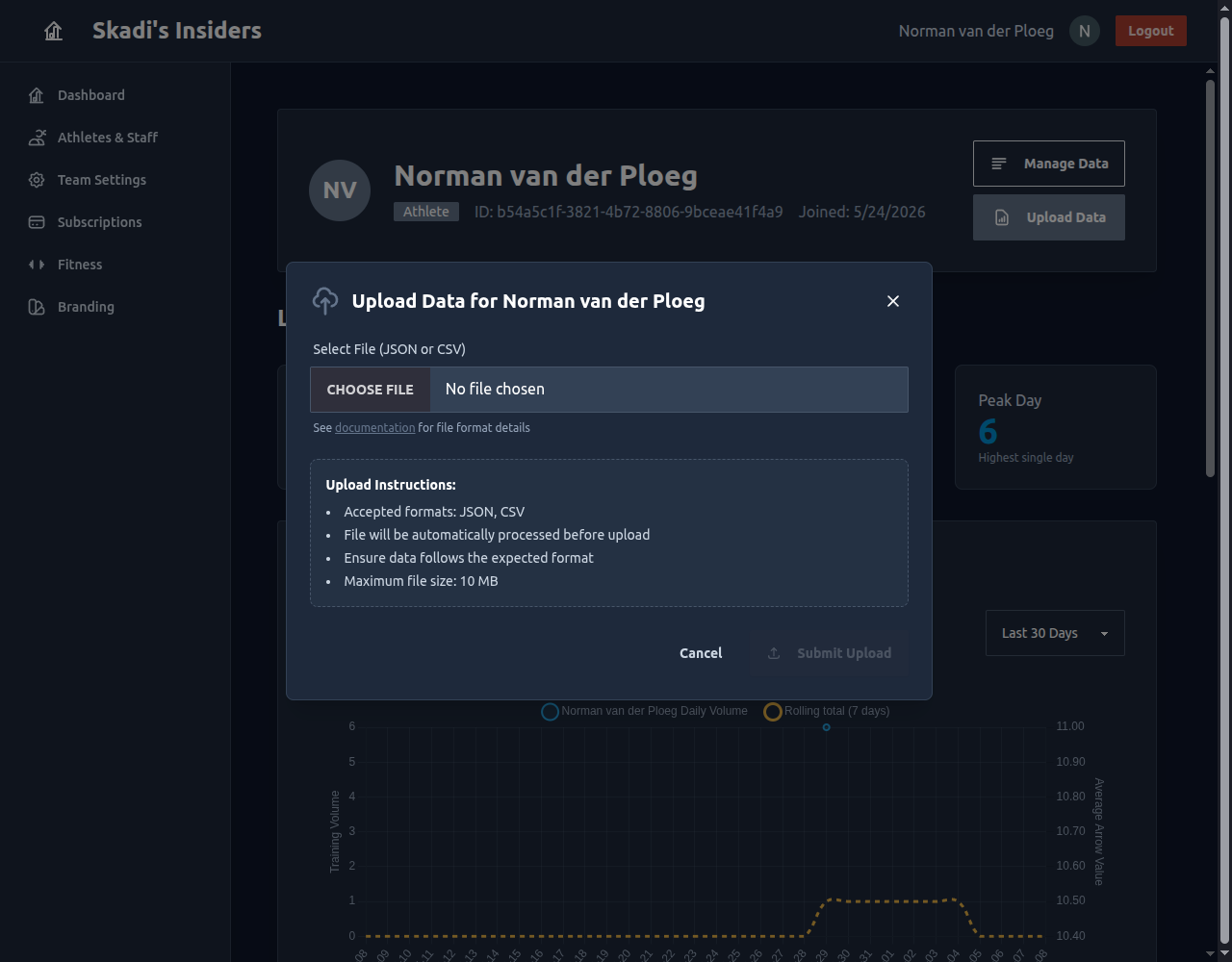
Training data is uploaded per athlete from the coach dashboard. Open your team, go to Athletes & Staff, and click an athlete to open their page. Then press Upload Data to open the upload window.
Pick a CSV or JSON file and Skadi's
Edge processes it immediately — nothing is saved yet. Because you're
uploading on a specific athlete's page, an athleteID column is optional: rows without one are attributed to that athlete.
You need the manage athlete records permission to upload. The team owner has it by default and can grant it to staff through their role.
File Format Requirements
Required Fields
Always Required:
dateThe date of the training session (YYYY-MM-DD format)typeThe type of training (e.g., "practice", "competition")bow_typeThe bow type used (e.g., "recurve", "compound", "barebow")
At Least One Required:
volumeORscoreEach record must contain either a volume value or a score value (or both).
Conditionally Required:
distanceRequired ONLY when a score is provided. For volume-only entries, distance is optional.
Optional Fields
athleteIDUnique identifier for the athlete (required for multi-athlete uploads)notesAdditional notes about the training sessionconditionsWeather or other environmental conditionslocationWhere the training took place
CSV Format
Example CSV File
date,distance,type,bow_type,volume,score,notes
2024-01-15,70,practice,recurve,144,,Morning session
2024-01-16,50,competition,recurve,72,680,Regional competition
2024-01-17,18,practice,recurve,108,,Indoor practice
Example: Volume-Only Upload (No Distance Required)
This example shows volume-only entries where distance is not required -
date,type,bow_type,volume,notes
2024-01-15,practice,recurve,120,Focused on form
2024-01-16,warmup,recurve,50,Light session
CSV Requirements
- First row must be the header with field names
- Use commas as delimiters
- Leave cells empty if data is not available (but ensure at least volume OR score is present)
- Dates must be in YYYY-MM-DD format
- No special formatting or formulas
JSON Format
Example JSON File
{
  "records": [
    {
      "date": "2024-01-15",
      "distance": 70,
      "type": "practice",
      "bow_type": "recurve",
      "volume": 144,
      "notes": "Morning session"
    },
    {
      "date": "2024-01-16",
      "distance": 50,
      "type": "competition",
      "bow_type": "recurve",
      "volume": 72,
      "score": 680,
      "notes": "Regional competition"
    }
  ]
}
Alternate JSON Format (Array)
You can also provide a simple array of records -
[
  {
    "date": "2024-01-15",
    "distance": 70,
    "type": "practice",
    "bow_type": "recurve",
    "volume": 144
  },
  {
    "date": "2024-01-16",
    "distance": 50,
    "type": "competition",
    "bow_type": "recurve",
    "score": 680
  }
]
Upload Types
athleteID Field
- Single-athlete upload component athleteID is optional in the file. If provided, only matching records are imported
- Multi-athlete upload athleteID is required in each row to identify which athlete the data belongs to
- Filtering Empty/null athleteID values in the file are ignored during filtering
Review & Confirm
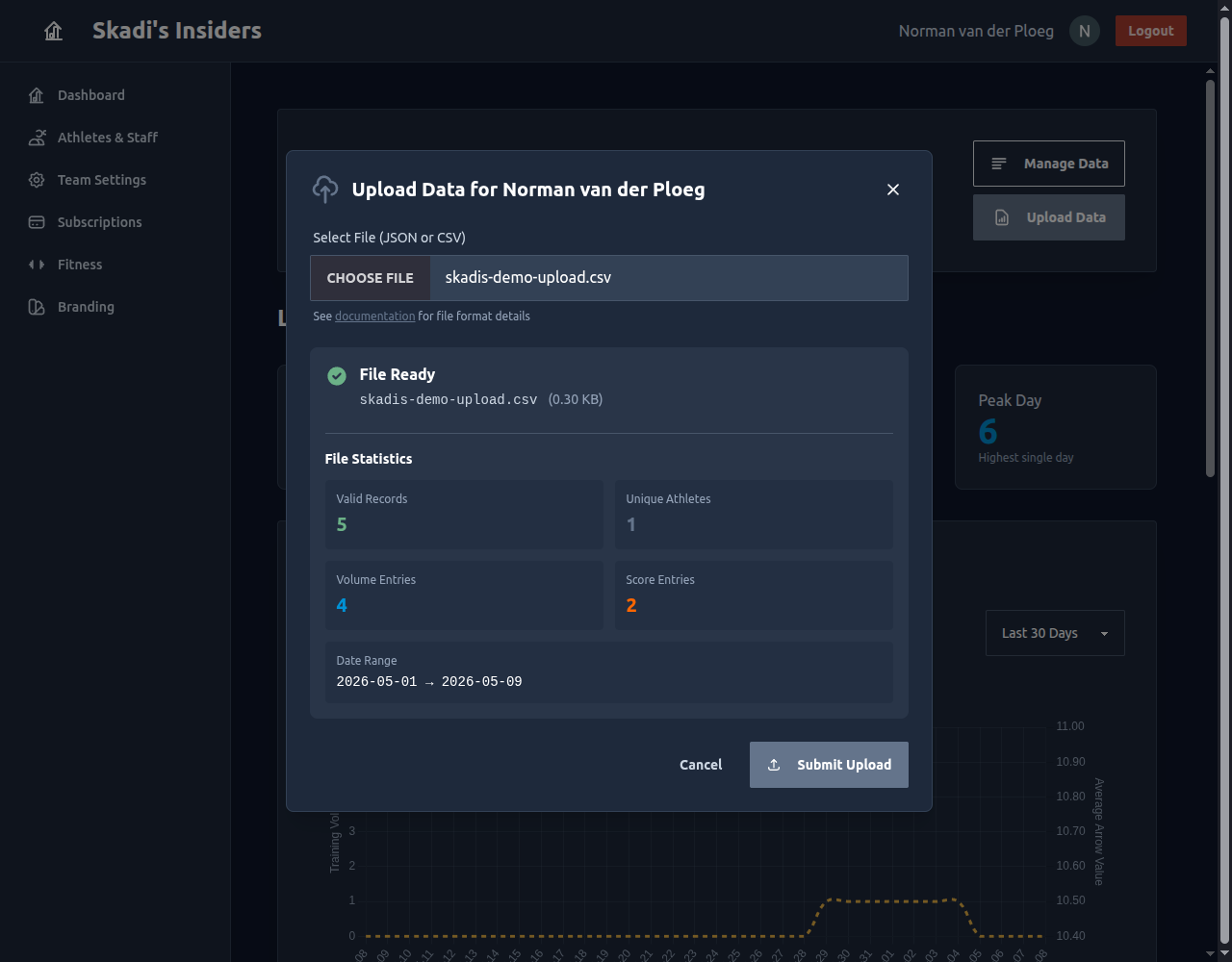
After selecting a file, the system will:
- Parse and validate all records
- Filter out invalid rows (missing required fields, invalid formats)
- Display the details:
- Valid vs. invalid record count
- Number of unique athletes (if applicable)
- Volume entry count
- Score entry count
- Date range covered
These File Statistics appear before anything is saved. Use them to sanity-check your data — confirm the counts and date range look right, then press Submit Upload to import.
Invalid Rows Are Filtered, Not Blocked
If some rows fail validation — for example a score with no distance, or
a missing bow_type —
Skadi's Edge skips just those rows and still imports the valid ones. The
statistics flag how many were filtered so you can spot problems before
confirming.
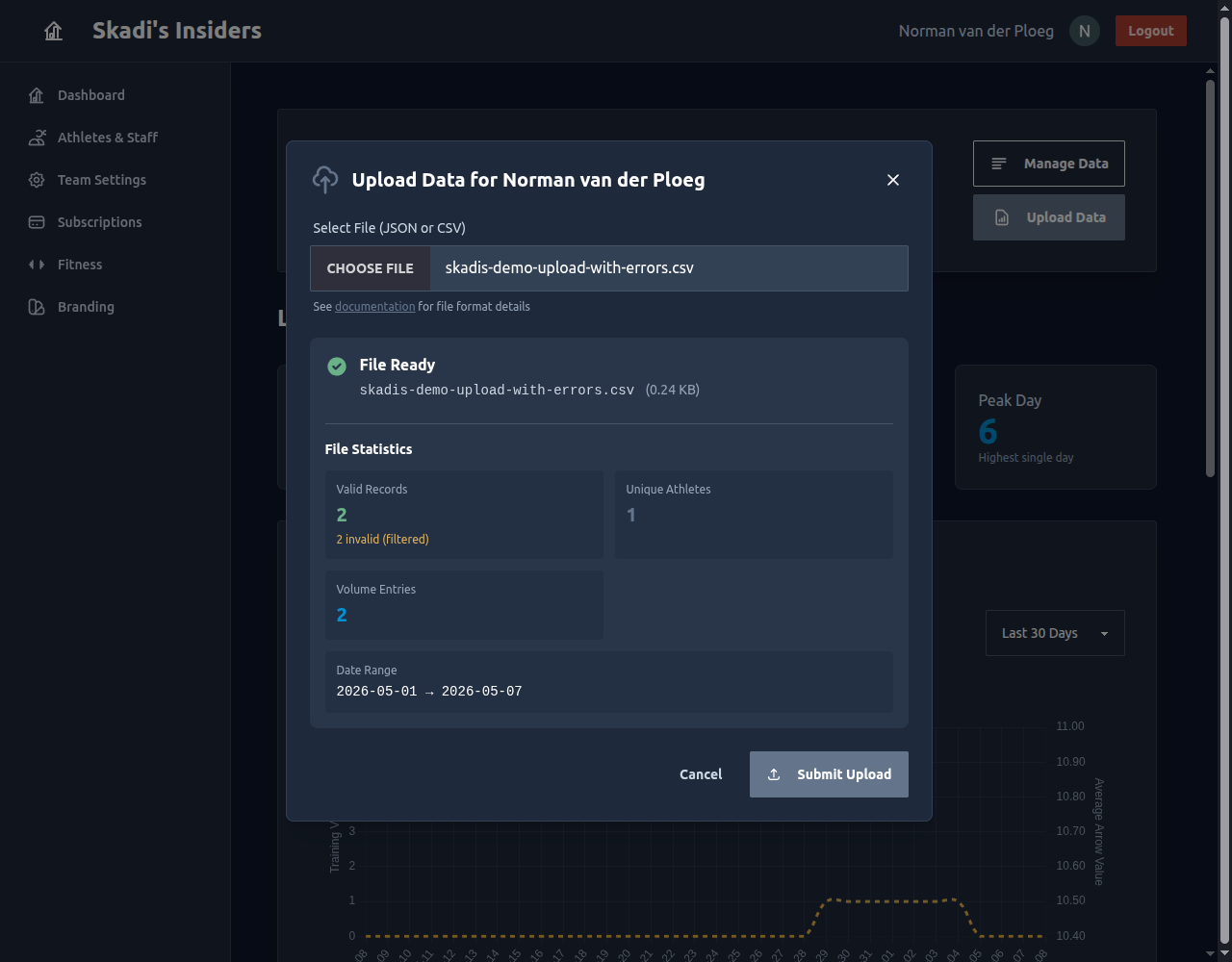
If a low valid-record count surprises you, fix the source file and re-select it — the statistics recompute instantly. On success you'll get a confirmation, and the athlete's charts update right away.
Tips for Success
- ✅ Use consistent date formatting (YYYY-MM-DD)
- ✅ Include headers in CSV files
- ✅ Test with a small file first before uploading large datasets
- ✅ Check the statistics before submitting to ensure all records are valid
- ✅ Verify athleteID values match your team's athlete IDs
- ✅ Remember distance is only required when you include a score
File Size Limits
- Maximum file size: 10 MB
- For larger datasets, consider splitting into multiple files
Need Help?
If you encounter issues with file uploads:
- Ensure each record has volume, score, or both
- Review the validation statistics for specific error counts
- Contact support if problems persist